

Table of Contents
AI coding agents can turn a product idea into working code, but they cannot reliably make every product decision on your behalf.
Give an agent a vague request such as “Build a project management app for startups” and it has to decide what a project is, who can access it, how tasks work, what the first release includes, and which features are unnecessary.
It may produce a functional-looking application, but that does not mean it built the product you intended.
The problem is often not the coding ability of the agent. It is the lack of decisions in the instructions it received.
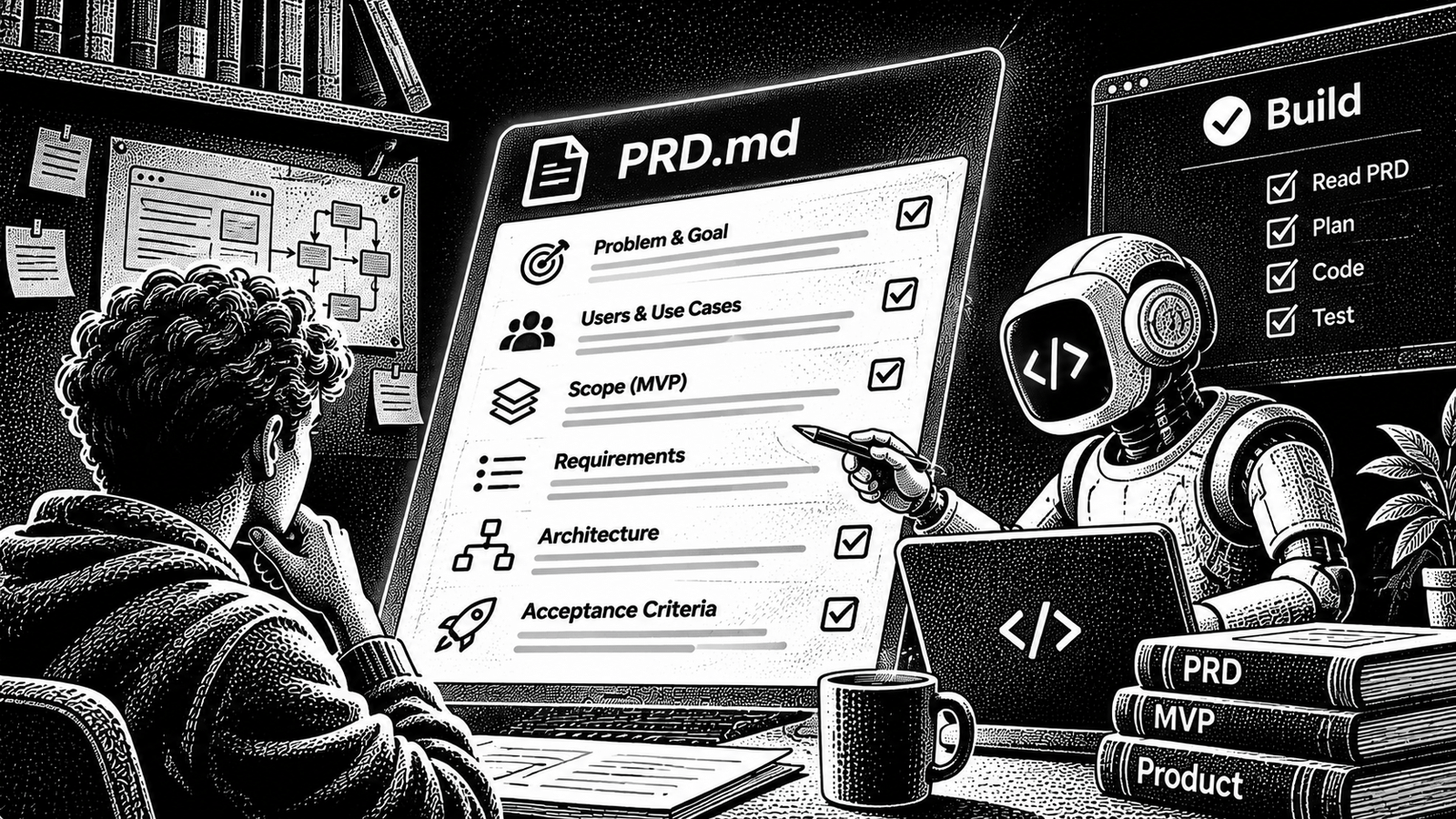
A Product Requirements Document (PRD) helps solve this problem. It explains the product’s purpose, target users, problems, expected outcomes, scope and important user-facing behaviour before implementation begins.
When the PRD is written for an AI coding agent, it needs to be especially clear about what is decided, what is excluded and what remains unknown.
This guide explains how to create a practical, seven-section PRD, review it with an AI agent, and hand it over for technical planning without letting the agent invent requirements.
What is a PRD, and why does an AI coding agent need one?
A Product Requirements Document describes what a product or feature should accomplish and why it should exist.
It gives the people building the product a shared understanding of:
- The problem being solved.
- The users who experience that problem.
- The outcomes the product should deliver.
- What belongs in the first release.
- What must not be built yet.
- How the product should behave from the user’s perspective.
- Which decisions are still unresolved.
A traditional PRD is often written for product managers, designers and engineers. An AI coding agent also needs to interpret it as working context.
That makes ambiguity particularly important.
Consider two requests:
Vague request
“Build a task management application where users can organise work and collaborate with their team.”
More useful product requirement
“Build a workspace for small software teams. A workspace member can create a project, add tasks to that project, assign each task to one workspace member, and change its status between To do, In progress and Done. Only workspace members can view the workspace’s projects and tasks.”
The second request makes several product decisions explicit. It defines the audience, core objects, user actions, statuses and access expectation.
It still does not describe the database schema, API design or framework. Those decisions belong in the technical specification and implementation plan.
That separation is important. A PRD should establish the product requirements before the agent decides how to implement them.
PRD vs technical specification vs implementation plan
These documents serve different purposes. They should connect to each other, not compete with each other.
| Document | Main question | What it contains |
|---|---|---|
| PRD | What should we build, for whom and why? | Problem, users, goals, scope, non-goals and product behaviour |
| Technical specification | How should the system implement those requirements? | Architecture, data, interfaces, technical constraints and detailed acceptance criteria |
| Implementation plan | In what order should the work be completed? | Tasks, dependencies, affected areas and verification steps |
For example, a PRD might say:
“Workspace members can invite another person to join their workspace.”
The technical specification would decide and document matters such as the invitation model, token handling, persistence, permissions and relevant acceptance criteria.
The implementation plan would break that specification into changes that can be developed and reviewed.
Do not turn the PRD into a massive technical document. The goal is to give the coding agent enough product context to plan the right implementation.
The seven sections of an agent-ready PRD
A useful starting structure contains seven sections:
- Product summary
- Problem and evidence
- Target users and jobs
- Goals and success measures
- Scope and non-goals
- Core user journeys and product behaviour
- Constraints, assumptions and open questions
Each section answers a different set of questions. Together, they give an agent a coherent product-level description without pretending every technical decision has already been made.
Section 1: Product summary
Start with a short description of what you are building.
An agent should be able to read this section and understand the product without interpreting a long vision statement.
Include:
- Product or feature name.
- One-sentence description.
- Target audience.
- Main problem.
- Intended outcome.
- Current product stage.
A simple format is:
Product: [Name]
For: [Target audience]
Problem: [Specific problem]
Outcome: [What users should be able to achieve]
Stage: [Prototype, MVP, existing product or new feature]
Example
Product: TeamTask
For: Small software teams
Problem: Teams currently coordinate small projects through scattered messages and spreadsheets.
Outcome: Give team members one place to organise projects, assign tasks and track progress.
Stage: First MVP
This is an illustrative product, not an actual customer case or a tested application.
Keep this section short. The remaining sections provide the detail.
Section 2: Problem and evidence
Explain the problem before describing the solution.
This is where founders often make a mistake: they start with features instead of explaining why those features are needed.
For every important problem, describe:
Current situation
How does the user handle the task today?
Friction
What takes too much time, creates confusion or causes errors?
Consequence
What happens because of the problem?
Evidence
What have you observed that supports the problem?
Evidence may come from customer interviews, support requests, actual workflows, existing product analytics, sales conversations or other research.
Distinguish observed facts from assumptions. If you have not interviewed users, do not write that customers repeatedly requested a feature.
For example:
| Statement | Classification |
|---|---|
| The team currently tracks tasks in a shared spreadsheet. | Observed fact, if verified |
| Several members update the same task list. | Observed fact, if verified |
| Members sometimes miss status changes. | Research finding, if supported |
| A shared task workspace will solve the problem. | Product hypothesis |
The coding agent does not need invented customer evidence. It needs to know what is known, what is believed and what still needs validation.
A useful rule is to attach a source or note to any important product decision that depends on research.
Section 3: Target users and jobs
Describe the people who will use the product and what they are trying to accomplish.
Avoid personas that contain only names, ages and fictional personality traits. Focus on roles, context, goals and the tasks they perform.
For example:
| User | Context | Main job |
|---|---|---|
| Workspace owner | Creates and manages a team workspace | Manage members and projects |
| Team member | Works on assigned project tasks | View, update and complete tasks |
| Project lead | Coordinates work across the team | Organise tasks and track progress |
Then describe the user’s core jobs.
A useful structure is:
“When [situation], the user wants to [action] so they can [outcome].”
Examples:
- When a new project starts, the workspace owner wants to create a project so the team has one place to organise its work.
- When a task is assigned, a team member wants to see its details and status so they know what needs to be completed.
- When work is finished, the team member wants to mark the task as done so the project lead can see progress.
Do not create ten user types when two or three explain the first release.
Also identify the primary user. If one role is responsible for the core workflow, say so.
This gives the agent a way to prioritise product behaviour when different users have different needs.
Section 4: Goals and success measures
Explain what the first release should achieve.
Separate product outcomes from implementation output.
“Build a dashboard” is a feature or deliverable.
“Allow a workspace owner to understand which tasks are incomplete” is a product outcome.
A PRD should identify the outcome and, where possible, how you will measure it.
Use a table:
| Goal | Measurement | Target or baseline |
|---|---|---|
| Users can create a project | Successful project creation events | Define after initial test |
| Members can update assigned tasks | Successful task updates | Define after initial test |
| Team members can access shared work | Successful authorised access | No unauthorised access |
| Users understand task status | Task status completion in usability testing | Define after research |
Do not invent a conversion target or performance benchmark simply to make the document look measurable.
When you do not have a baseline, state that it needs to be measured.
For example:
“Baseline unknown. Instrument the relevant event in the MVP and review it after the first group of users has completed the workflow.”
This gives the team a measurement plan without presenting an unsupported number as a business target.
Section 5: Scope and non-goals
This is one of the most important sections when writing a PRD for an AI coding agent.
You need to explain both what belongs in the product and what must stay out.
Without clear boundaries, an agent may interpret a broad request as permission to add features that were never part of the plan.
Define the first-release scope
List only the capabilities required to deliver the core outcome.
For the illustrative TeamTask product:
| Included in MVP | Reason |
|---|---|
| Create a workspace | Establish the shared working area |
| Add workspace members | Allow the team to collaborate |
| Create projects | Organise work |
| Create and assign tasks | Support the main workflow |
| Update task status | Track progress |
| View tasks within a workspace | Give members access to relevant work |
Define non-goals
A non-goal is something the product explicitly will not attempt to deliver in the current release.
For TeamTask:
| Not included in MVP | Why it is excluded |
|---|---|
| Time tracking | Not required for the first task workflow |
| Gantt charts | More advanced project planning |
| Billing and subscriptions | Not part of the current MVP objective |
| Public project sharing | Outside the private workspace model |
| Automated AI task generation | Can be evaluated after the core workflow works |
These are illustrative product decisions.
Do not use vague non-goals such as “avoid unnecessary features.” Name the actual capabilities that must not be added.
A strong non-goal is specific enough that you can detect when the agent violates it.
Also distinguish between a feature that is excluded and a feature whose decision is still open. “Not in MVP” is a decision. “We have not decided” is not.
Section 6: Core user journeys and product behaviour
Describe the important things users must be able to do.
Think in terms of complete workflows, not just a list of screens.
For each core journey, explain:
- Who starts the journey?
- What do they need before starting?
- What action do they take?
- What should happen next?
- What does the user see when it succeeds?
- What happens when it cannot be completed?
For the illustrative TeamTask product, the first journeys could be:
Journey A: Create a workspace
- A user creates an account.
- The user creates a workspace.
- The workspace becomes available to its owner.
- The owner can open the workspace and begin organising work.
Journey B: Create a project
- A workspace owner opens a workspace.
- The owner creates a project.
- The project appears in the workspace.
- Workspace members who have permission can view it.
Journey C: Assign a task
- A member opens a project.
- The member creates a task with a title and description.
- The member assigns the task to a workspace member.
- The assigned member can view the task.
- The task’s status can be updated as work progresses.
These journeys explain product behaviour. They do not dictate how the agent must implement the database, API or frontend.
Describe important states and rules
Agents need more than happy-path descriptions.
For the task workflow, define:
| Area | Product decision |
|---|---|
| Task statuses | To do, In progress, Done |
| Task assignment | Assign to one member of the same workspace |
| Task visibility | Visible to authorised workspace members |
| Empty project | Show a useful empty state |
| Invalid assignment | Do not assign a task to a person outside the workspace |
Where an important decision is unresolved, label it as an open question rather than quietly choosing an answer.
For example, if multiple assignees have not been decided, do not let the agent assume that a task can have five assignees.
Keep product behaviour separate from technical design
The PRD can state:
“Only members of a workspace can see its private projects.”
It should not casually prescribe an unreviewed database structure or security implementation.
The technical specification should translate the product rule into architecture, access controls, data ownership, tests and implementation constraints.
This handoff prevents the PRD from becoming an unstructured mixture of product choices and code-level instructions.
Section 7: Constraints, assumptions and open questions
The final section tells the agent what it must respect and where it must not guess.
Constraints
Constraints are decisions the implementation must respect.
Examples:
- The first release is for desktop and mobile web.
- Existing authentication must be retained.
- The product must work with the current repository.
- Existing users and their data must not be broken.
- No production deployment or paid-service purchase may happen without approval.
Only include constraints that apply to your product.
Assumptions
An assumption is something you currently believe but have not confirmed.
Examples:
- The first release is intended for small teams.
- One task has one assignee.
- A workspace has one owner.
- Users are comfortable managing tasks in a browser.
If an assumption is important, decide whether it is safe to proceed or whether the agent should ask before planning implementation.
Open questions
List decisions that still need answers.
| Question | Why it matters | Owner | Status |
|---|---|---|---|
| Can a task have more than one assignee? | Changes the product behaviour | Product owner | Open |
| Can a workspace have multiple owners? | Affects workspace management | Product owner | Open |
| Should members be able to delete projects? | Defines important permissions | Product owner | Open |
An agent should not convert an open question into a permanent product decision without permission.
For each question, decide whether it blocks the first release or can be deferred.
A reusable PRD template for AI coding agents
The following template can be copied into a Markdown file such as docs/prd.md. Keep it in the project repository so the document can be reviewed and versioned alongside the product.
# Product Requirements Document

## Document information

Product:
Feature:
Owner:
Status: Draft / Reviewed / Approved
Last updated:

---

## 1. Product summary

Product description:

Target audience:

Problem:

Desired outcome:

Current product stage:

---

## 2. Problem and evidence

Current situation:

Problems experienced:

Consequences:

Evidence and sources:

Observed facts:

Assumptions:

---

## 3. Target users and jobs

Primary user:

Other relevant users:

User context:

Core jobs to be done:

1.
2.
3.

---

## 4. Goals and success measures

Product goals:

1.
2.
3.

Success measures:

| Goal | Measurement | Baseline | Target |

Unknown measurements or research needed:

---

## 5. Scope and non-goals

### Included in this release

1.
2.
3.

### Explicitly excluded

1.
2.
3.

### Deferred decisions

1.
2.

---

## 6. Core user journeys and product behaviour

### Journey 1

User:

Starting condition:

Steps:

Expected outcome:

Failure or empty states:

### Journey 2

User:

Starting condition:

Steps:

Expected outcome:

Failure or empty states:

### Product rules

1.
2.
3.

### Important states

1.
2.

---

## 7. Constraints, assumptions and open questions

### Constraints

1.
2.
3.

### Assumptions

1.
2.

### Open questions

| Question | Impact | Owner | Blocks implementation? |

### Approval boundaries

Actions requiring explicit approval:

1.
2.

Actions the agent must not perform:

1.
2.

---

## Review status

Product owner review:

Approved for technical specification: Yes / No

Approved by:

Date:
Do not treat a blank template as a completed PRD. Fill it with actual product decisions, label unknowns and obtain the necessary approvals.
How to use AI to review and improve your PRD
You can use an AI assistant to help draft the document, identify missing information and challenge assumptions.
However, do not ask it to invent the product requirements.
A better workflow is to give it your raw notes, explain the target user and problem, and ask it to identify what it does not know.
Prompt 1: Turn raw notes into a PRD draft
You are acting as a product requirements analyst.

I am going to provide rough notes about a product or feature.

Your job is to help me create a seven-section PRD:

1. Product summary
2. Problem and evidence
3. Target users and jobs
4. Goals and success measures
5. Scope and non-goals
6. Core user journeys and product behaviour
7. Constraints, assumptions and open questions

Important rules:

- Do not invent customer research, product decisions, metrics,
  user roles or technical constraints.
- Separate confirmed facts from assumptions.
- Mark missing information as OPEN.
- Identify contradictions in my notes.
- Ask clarifying questions when an unresolved decision
  would materially change the product.
- Keep product requirements separate from technical
  implementation details.
- Do not write code or modify project files.

Start by reviewing my notes and identifying the information
needed for a useful PRD. Then draft the document only after
the missing product decisions have been discussed.

My product notes:

[PASTE YOUR NOTES HERE]
This prompt makes the agent act as a reviewer and organiser rather than a feature generator.
Prompt 2: Challenge the PRD
Once the first draft is complete, ask another pass to find ambiguity.
Review this PRD as a critical product reviewer.

Do not rewrite it immediately.

Identify:

1. Vague or ambiguous product requirements.
2. Missing user roles or important workflows.
3. Requirements that contradict each other.
4. Features that are outside the stated MVP scope.
5. Non-goals that are not explicit enough.
6. Success measures that cannot currently be evaluated.
7. Assumptions presented as confirmed facts.
8. Open questions that should block implementation.

For every issue, explain why it matters and suggest
the exact question the product owner should answer.

Do not invent answers.

PRD:

[PASTE PRD HERE]
This review is important because a document can look complete while still leaving critical product decisions unresolved.
Prompt 3: Prepare the technical handoff
After the PRD is reviewed and approved, ask the agent to plan the next document.
The attached PRD has been approved as the product-level
source of truth.

Now prepare a technical discovery and specification brief.

First inspect the existing repository if one is provided.

Do not modify any files.

Your output must:

1. Summarise the approved product requirements.
2. Identify existing architecture and reusable patterns.
3. Identify technical decisions that still need to be made.
4. Identify affected application areas.
5. List data, integration, authentication and permission
   questions relevant to the product.
6. Identify technical risks and dependencies.
7. Propose the sections needed in a separate technical
   specification.
8. List all assumptions that require approval.

Do not change product scope.
Do not invent existing repository capabilities.
Do not implement the feature.
Do not proceed past unresolved blocking decisions.

Wait for review and approval before implementation planning.
The output of this step becomes the starting point for a technical specification, not a substitute for one.
For that next stage, see the upcoming guide on writing a technical specification for an AI coding agent. The final destination will be added when that article is published.
How to hand the PRD to an AI coding agent
Once the document is approved, place it in the repository in a location that is easy to find.
For example:
my-saas/
├── docs/
│   ├── prd.md
│   ├── technical-spec.md
│   └── implementation-plan.md
├── src/
├── tests/
├── README.md
└── AGENTS.md
This is an illustrative structure, not a requirement for every project.
For Codex, AGENTS.md can provide repository-level instructions. Other coding tools have their own supported instruction files and context mechanisms, so check the documentation for the harness you use.
Useful project instructions can cover:
- What the project does.
- Its architecture and important directories.
- Existing coding conventions.
- Relevant libraries and patterns.
- Build, lint and test commands.
- Rules for completing and verifying changes.
OpenAI’s Codex prompting guidance explains how AGENTS.md instructions can be loaded into coding sessions. Microsoft’s VS Code documentation also explains how project-specific instructions provide agents with repository architecture, commands and conventions. See Codex Prompting Guide and Configure AI for your codebase.
Ask the agent to plan before implementation
For a substantial feature, do not jump directly from the PRD to “build everything.”
Ask the agent to:
- Read the approved PRD.
- Inspect the existing repository.
- Identify the relevant code and project patterns.
- Produce a technical specification.
- Identify unresolved technical decisions.
- Create an implementation plan.
- Wait for review before changing files.
This lets you review whether the proposed approach actually matches the product requirements.
Microsoft’s current VS Code agent-planning guidance recommends reviewing and refining the implementation plan before starting implementation. The plan should cover relevant requirements, implementation steps and verification. See Planning with agents in VS Code.
Do not assume a PRD guarantees correct code
A good PRD reduces ambiguity, but it cannot guarantee that an agent will implement the product correctly.
The repository might contain undocumented behaviour. Existing APIs may differ from your assumptions. Technical dependencies may create constraints that were not known when the PRD was written.
That is why the handoff needs a review and verification stage.
After implementation, compare the result against the approved requirements, inspect the code changes and run the relevant checks. A successful build alone does not prove that the product behaves as intended.
Common mistakes when writing a PRD for an AI coding agent
1. Starting with a list of features
A list of features does not explain why those features exist or which user problem they solve.
Start with the problem and the expected outcome. Then decide what belongs in the first release.
2. Writing vague requirements
“Make the dashboard user-friendly” is not sufficiently clear.
Describe what the user should be able to see or do and what behaviour is expected.
3. Forgetting non-goals
If the agent is not told what to exclude, it may propose extra features that seem reasonable but do not belong in the first release.
Write explicit exclusions.
4. Mixing product decisions with implementation decisions
“Users can invite workspace members” is a product requirement.
“Use a particular database schema and token implementation” is a technical design decision.
Keep them in the appropriate document.
5. Asking AI to invent business logic
An AI agent can suggest options, but it cannot know your intended pricing model, user permissions, target market or commercial rules unless you provide that information or approve its proposal.
Mark assumptions and ask questions.
6. Adding every possible feature to the MVP
More requirements mean more work and more decisions to verify.
Keep the first release focused on the smallest complete workflow that can deliver the intended outcome.
7. Skipping the review before implementation
A PRD is not approved just because an AI agent has generated it.
The product owner must review the decisions, resolve important questions and confirm the scope before implementation begins.
PRD readiness checklist
Before handing your document to a coding agent, check the following:
- The product is described in one clear paragraph.
- The target users are identified.
- The problem is explained with supporting evidence or labelled assumptions.
- The desired product outcomes are clear.
- Success measures are defined or explicitly marked as unknown.
- The first-release scope is listed.
- Non-goals are explicit.
- Important user journeys are described.
- Product rules and important states are documented.
- Constraints and dependencies are listed.
- Assumptions are separated from confirmed facts.
- Open questions have an owner.
- Approval boundaries are stated.
- A human product owner has reviewed and approved the document.
A PRD that fails several of these checks should be revised before it becomes the basis for implementation.
Frequently asked questions
What should a PRD for an AI coding agent contain?
A useful PRD should contain the product summary, problem and evidence, target users, goals, success measures, scope, non-goals, user journeys, product behaviour, constraints, assumptions and open questions. The document should explain the product without prescribing every technical implementation detail.
How detailed should a PRD be for an AI coding agent?
It should be detailed enough to remove important product ambiguity, but not so detailed that it becomes an unreviewed technical design. Explain users, outcomes, scope, workflows and product rules. Move architecture, data design and detailed implementation acceptance criteria into the technical specification.
Can I use ChatGPT to write a PRD?
Yes. You can provide product notes, interview findings, constraints and decisions, then ask ChatGPT to organise them into a PRD and identify missing information. You must review the output and correct assumptions. Do not treat generated requirements as customer research or approved product decisions.
Is a PRD the same as a prompt?
No. A prompt is an instruction sent to an AI system. A PRD is a structured product document that records decisions and requirements. You can use a prompt to ask an agent to read, review or implement from a PRD, but the PRD should remain the stable product reference.
Should I write a PRD for every feature?
Not always. Small, isolated changes may only need a short brief. Larger features, workflows involving multiple user roles, changes to permissions or data, and features with important dependencies benefit from a more complete PRD.
Should the PRD include the tech stack?
It can record constraints that are already decided, such as an existing framework or a requirement to preserve the current architecture. But detailed architecture, database decisions, API contracts and implementation design belong in the technical specification.
What if the AI coding agent finds missing information?
It should identify the missing decision, explain why it matters and ask the product owner when it blocks a correct implementation. It should not silently invent a product rule and treat it as approved.
Can one PRD be used with different AI coding tools?
Yes, if it is written in a clear, tool-agnostic format such as Markdown. However, repository instructions and context-loading mechanisms vary between tools. Keep the product requirements independent of a specific coding agent, then adapt the handoff to the tool being used.
Final takeaway
An AI coding agent does not need a longer prompt. It needs a clearer product decision.
A good PRD explains the problem, identifies the users, defines the desired outcome, limits the first release and describes the behaviour the product must deliver.
Keep non-goals explicit. Separate facts from assumptions. Leave unresolved questions visible. Review the PRD before asking the agent to plan the technical implementation.
The objective is not to make the agent decide what your product should be. It is to give the agent enough clear context to help you build the product you have actually decided to make.
Sources and further reading
- OpenAI: Codex Prompting Guide — repository instructions and
AGENTS.mdcontext. - Microsoft: Configure AI for Your Codebase — project instructions, repository conventions and validation.
- Microsoft: Planning with Agents in VS Code — reviewing implementation plans before execution.
- Microsoft: Understand Agent Customization — persistent context, instructions and reusable workflows.
- OpenAI: Iterating Development Workflows with Codex — phased development and repository context.
Tool-specific instructions and agent workflows checked on 1 November 2026. Features and file-loading behaviour can change; consult the current documentation for the coding tool you use.

[…] useful starting point is to turn your PRD for an AI coding agent into explicit acceptance criteria, then use a technical specification to define implementation […]